
WEBXPAY- Redirect Mechanism Integration Guide
Version 3.0
Table of Contents
1.Introduction 1.1 Purpose 1.2 Scope 2. Integration 2.1 Payment Workflow 2.2 Request Parameters 2.3 Response Parameters 2.4 Gateway Status Codes 2.4.1 Response Status Codes 2.4.2 Error Codes 2.5 Transaction Request 2.5.1 Gateway ID's 2.5.2 EMI Gateway ID's 2.6 Transaction Response 3. Sample Code (PHP)1. Introduction
WEBXPAY Gateway offers a highly secure, mobile-responsive, and user-friendly payment solution. It supports transactions from any gateway integrated with a merchant's website, accommodating all international card brands and various local payment methods such as eZ Cash, mCash, Frimi, Upay, Genie, and DFCC Wallet. To enhance security, alerts are implemented to detect any fraudulent activities and manage chargeback processes.
This integration guide provides developers with a comprehensive understanding of the integration process and the necessary software requirements. It includes sample code snippets to assist in seamlessly integrating the gateway functionalities with the merchant's website.
1.1 Purpose
The purpose of this document is to guide developers through the integration of the WEBXPAY Gateway with merchant websites. It aims to provide clear, concise instructions and sample code snippets to ensure a smooth and efficient integration process. By following this guide, developers will be able to implement a secure, mobile-responsive, and user-friendly payment gateway that supports a wide range of international and local payment methods, enhancing the overall transaction experience for both merchants and customers.
1.2 Scope
This document encompasses the necessary steps and requirements for integrating the WEBXPAY Gateway with merchant websites. It covers the following aspects:
- • Integration Overview: An introduction to the WEBXPAY Gateway and its key features.
- • Supported Payment Methods: Details on the international card brands and local payment methods accepted by the gateway.
- • Security Measures: Information on security alerts and fraud detection mechanisms.
- • Technical Requirements: A comprehensive list of software and hardware prerequisites for successful integration.
- • Integration Process: Step-by-step instructions for integrating the gateway with a merchant's website, including sample code snippets.
- • Testing and Validation: Guidelines for testing the integration to ensure proper functionality.
- • Troubleshooting: Common issues and solutions to assist developers in resolving potential problems.
By adhering to this guide, developers will ensure a seamless integration of the WEBXPAY Gateway, providing a secure and efficient payment experience for users.
2. Integration
Customer and order data are transmitted to the following endpoints for the customers to proceed with payments in the merchant's website.
| Interaction Point | URL |
|---|---|
| Payment Request URL (LIVE) | https://webxpay.com/index.php?route=checkout/billing |
| Payment Request URL (STAGING) | https://stagingxpay.info/index.php?route=checkout/billing |
2.1 Payment Workflow
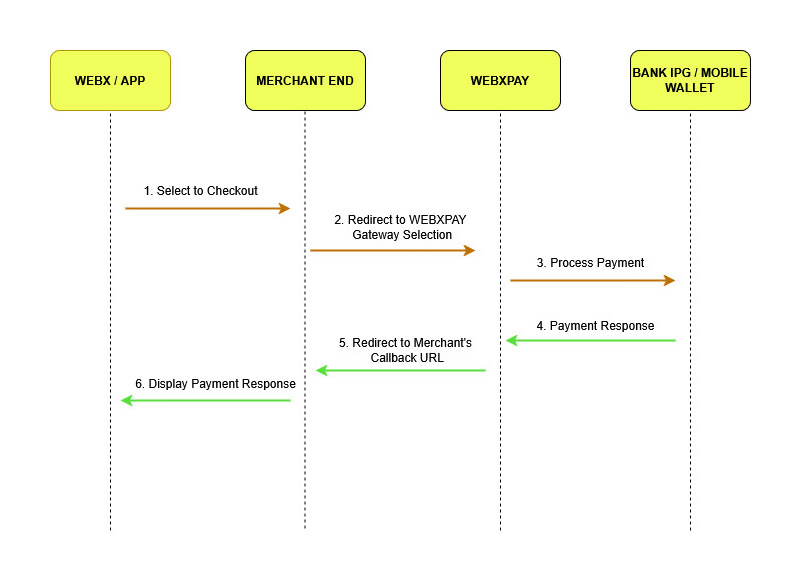
The sequence of events associated with WEBXPAY Gateway initializing from customer to the point of checkout is depicted below.
2.2 Request Parameters
The request has to be a HTTP POST request, and parameters required by WEBXPAY Gateway are as follows.
| Parameter Name | Description | Mandatory | Max Character Count |
|---|---|---|---|
| first_name | Customer's first name | Yes | 30 |
| last_name | Customer's last name | Yes | 30 |
| Customer's email address | Yes | Valid email format | |
| contact_number | Customer's contact number | Yes | Max 20, Min 9 Characters (Numbers and plus (+) sign only) |
| address_line_one | Customer's address | Yes | |
| address_line_two | Customer's address | No | |
| city | Customer's city | No | |
| state | Customer's state | No | |
| postal_code | Customer's postal code | No | |
| country | Customer's country | No | |
| secret_key | Provide upon registration. The key can be retrieved from the merchant backend under Settings > Integrations menu. | Yes | |
| payment | Refer section 2.5 | Yes | |
| cms | Magento, Prestashop, Woo Commerce, Opencart, PHP, IOS, etc... | Yes | |
| process_currency | LKR, USD, GBP, AUD | Yes | |
| custom_feilds | Refer section 2.7 | No | |
| payment_gateway_id | Refer section 2.5.1 | No |
2.3 Response Parameters
| Parameter Name | Description |
|---|---|
| Payment | Refer Section 2.5 Transaction Request |
| Signature | The checksum of payment parameter to validate the response is not tampered. |
| Custom Feilds | Variables passed to gateway side rather than main variables |
The customer is redirected to the merchant's website with the following parameters when the payments are being processed.
2.4 Gateway Status Codes
2.4.1 Response Status Codes
Response status codes are used to track down the transaction statuses. The status codes depend on the gateways chosen by the merchant.
| Code | Status | Description |
|---|---|---|
| 0 | Transaction Approved | The Transaction was Successful |
| 00 | Transaction Approved | The Transaction was Successful |
| 15 | Transaction Declined | The Transaction was Unsuccessful |
2.4.2 Error Codes
The following are some of the most common error codes displayed on merchant websites when the required information result in failure.
| Error Code | Description |
|---|---|
| 401 | Invalid access |
| 402 | Can't identify product |
| 403 | Invalid Secret Key |
| 405 | First name is required |
| 406 | Last name is required |
| 407 | Email Address is required |
| 408 | Contact Number is required |
| 409 | Total amount less than 1 USD / 1 LKR |
| 410 | LKR total amount exceed |
| 411 | USD total amount exceed |
| 412 | Not supported currency code |
| 413 | Can't find the Gateways |
| 414 | Selected gateway is not found |
| 415 | Error gateway ID |
| 416 | Bank Response not received |
| 417 | Currency code not defined |
| 418 | Return URL missing X Gateway |
| 419 | Transaction Blocked for this IP Address |
| 420 | Transaction Blocked for this E-mail address |
| 421 | Transaction Blocked for this merchant |
| 423 | An error has occurred while processing your payment |
| 424 | Invalid Request URL |
Note:
The merchant should set the response messages on their websites regarding the statuses of each transaction. For example, when a transaction is completed, the customer should view a response as "Transaction Successful". And when a transaction is not completed, the customer should view a response saying, "Transaction Incomplete", along with other details.
2.5 Transaction Request
# Define 'payment' parameters
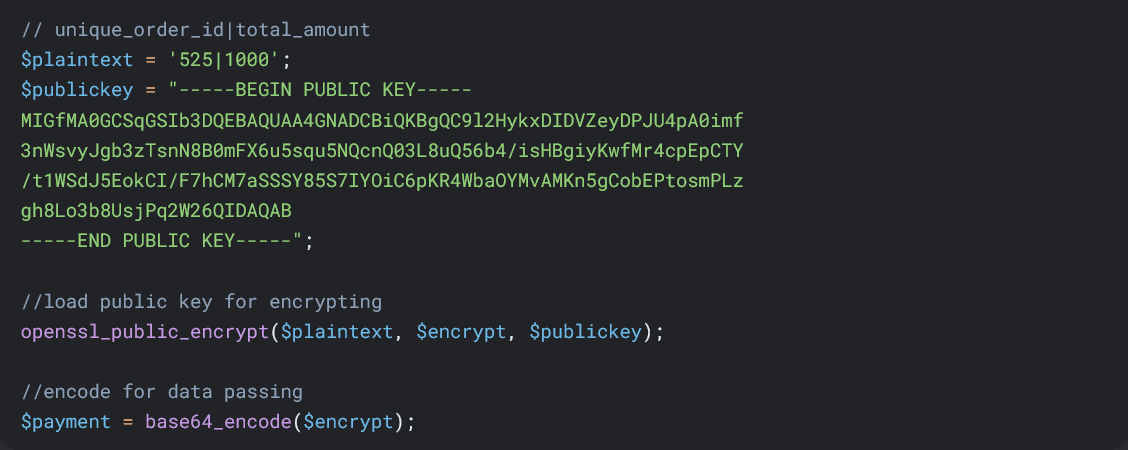
The format of "payment" parameter would be as follows:
unique_order_id|total_amount (Eg : 12001|2567.50)
The above format will then be encrypted using the public key provided by WEBXPAY. This is achieved by using openssl_public_encrypt method and then needs to be encoded with base64_encode method. The public key can be retrieved from the merchant backend under Settings.
(Public and secret keys will be generated once the merchant account is activated and can be accessed via Dashboard > Settings > Integration Information > Generate keys)
# Define custom parameter
The format of the 'custom_fields' parameter is as follows.
parameter1|parameter2|parameter3|parameter4
The "custom_fields" parameter consists of the above variables which then need to be encoded using base64_encode.

# Define the payment request URL

2.5.1 Gateway ID's
If the "payment_gateway_id" parameter is set in the gateway request, corresponding payment option will be selected automatically, and the gateway payment selection page will be skipped.
Additionally, you can pass multiple payment gateway Id's by using "|" separator
Ex:
Selected Gatewayid: <input type="text" name="payment_gateway_id" value="40">
Bulk Payment Gateway IDs<input type="text" name="multiple_payment_gateway_ids" value="40|44|96" placeholder="| seperated ids" >
Following is the available gateway ID's
| Gateway ID | IPG | Display |
|---|---|---|
| 2 | eZ Cash (LKR) | eZ Cash (LKR) |
| 3 | mCash (LKR) | mCash (LKR) |
| 4 | Nations Trust Bank - AMEX (LKR) | AMEX (LKR) |
| 8 | Nations Trust Bank - AMEX (USD) | AMEX (USD) |
| 5 | Sampath Viswa (LKR) | Sampath Viswa (LKR) |
| 47 | Hatton National Bank (USD) | HNB (USD) |
| 46 | Hatton National Bank (LKR) | HNB (LKR) |
| 16 | DFCC Wallet (LKR) | DFCC - Wallet (LKR) |
| 35 | FriMi (LKR) | FriMi (LKR) |
| 36 | Seylan Bank (LKR) | Seylan Bank (LKR) |
| 37 | Seylan Bank (USD) | Seylan Bank (USD) |
| 38 | Commercial Token (LKR) | Commercial Token (LKR) |
| 39 | Commercial Token (USD) | Commercial Token (USD) |
| 40 | Commercial Bank MPGS (LKR) | Commercial Bank MPGS (LKR) |
| 41 | Commercial Bank MPGS (USD) | Commercial Bank MPGS (USD) |
| 42 | Genie Visa Master (LKR) | Genie Visa Master (LKR) |
| 43 | Cargils Bank Visa Master (LKR) | Cargils Bank Visa Master (LKR) |
| 44 | Cargills Bank Token (LKR) | Cargills Bank Token (LKR) |
| 45 | UPay (LKR) | UPay (LKR) |
| 52 | Promotional Gateway | V/M Promotional (LKR) |
| 96 | Lanka QR | Lanka QR |
2.5.2 EMI Gateway ID's
| Gateway ID | Bank | Tenor |
|---|---|---|
| 23 | NTB - AMEX | EMI 03 Month (LKR) |
| 24 | NTB - AMEX | EMI 06 Month (LKR) |
| 25 | NTB - AMEX | EMI 12 Month (LKR) |
| 26 | NTB - AMEX | EMI 20 Month (LKR) |
| 27 | NTB - AMEX | EMI 24 Month (LKR) |
| 28 | NTB - AMEX | EMI 36 Month (LKR) |
| 48 | HNB | EMI 3 Month (LKR) |
| 49 | HNB | EMI 6 Month (LKR) |
| 50 | HNB | EMI 12 Month (LKR) |
| 51 | HNB | EMI 24 Month (LKR) |
| 53 | DFCC | EMI 3 Month (LKR) |
| 54 | DFCC | EMI 6 Month (LKR) |
| 66 | DFCC | EMI 7 Month (LKR) |
| 67 | DFCC | EMI 9 Month (LKR) |
| 55 | DFCC | EMI 12 Month (LKR) |
| 68 | DFCC | EMI 15 Month (LKR) |
| 69 | DFCC | EMI 18 Month (LKR) |
| 56 | DFCC | EMI 24 Month (LKR) |
| 70 | DFCC | EMI 27 Month (LKR) |
| 71 | DFCC | EMI 36 Month (LKR) |
| 72 | DFCC | EMI 41 Month (LKR) |
| 61 | Commercial Bank | EMI 3 Month (LKR) |
| 57 | Commercial Bank | EMI 6 Month (LKR) |
| 62 | Commercial Bank | EMI 9 Month (LKR) |
| 58 | Commercial Bank | EMI 12 Month (LKR) |
| 59 | Commercial Bank | EMI 18 Month (LKR) |
| 60 | Commercial Bank | EMI 24 Month (LKR) |
| 63 | Commercial Bank | EMI 36 Month (LKR) |
| 64 | Commercial Bank | EMI 48Month (LKR) |
| 65 | Commercial Bank | EMI 60 Month (LKR) |
| 75 | NDB | EMI 6 Month (LKR) |
| 76 | NDB | EMI 9 Month (LKR) |
| 77 | NDB | EMI 12 Month (LKR) |
| 78 | NDB | EMI 18 Month (LKR) |
| 79 | NDB | EMI 24 Month (LKR) |
| 80 | NDB | EMI 36 Month (LKR) |
| 81 | NDB | EMI 60 Month (LKR) |
| 90 | Seylan | EMI 6 Month (LKR) |
| 91 | Seylan | EMI 12 Month (LKR) |
| 92 | Seylan | EMI 24 Month (LKR) |
| 97 | Union Bank | EMI 3 Month (LKR) |
| 98 | Union Bank | EMI 6 Month (LKR) |
| 99 | Union Bank | EMI 12 Month (LKR) |
| 100 | Union Bank | EMI 18 Month (LKR) |
| 101 | Union Bank | EMI 24 Month (LKR) |
| 102 | Union Bank | EMI 36 Month (LKR) |
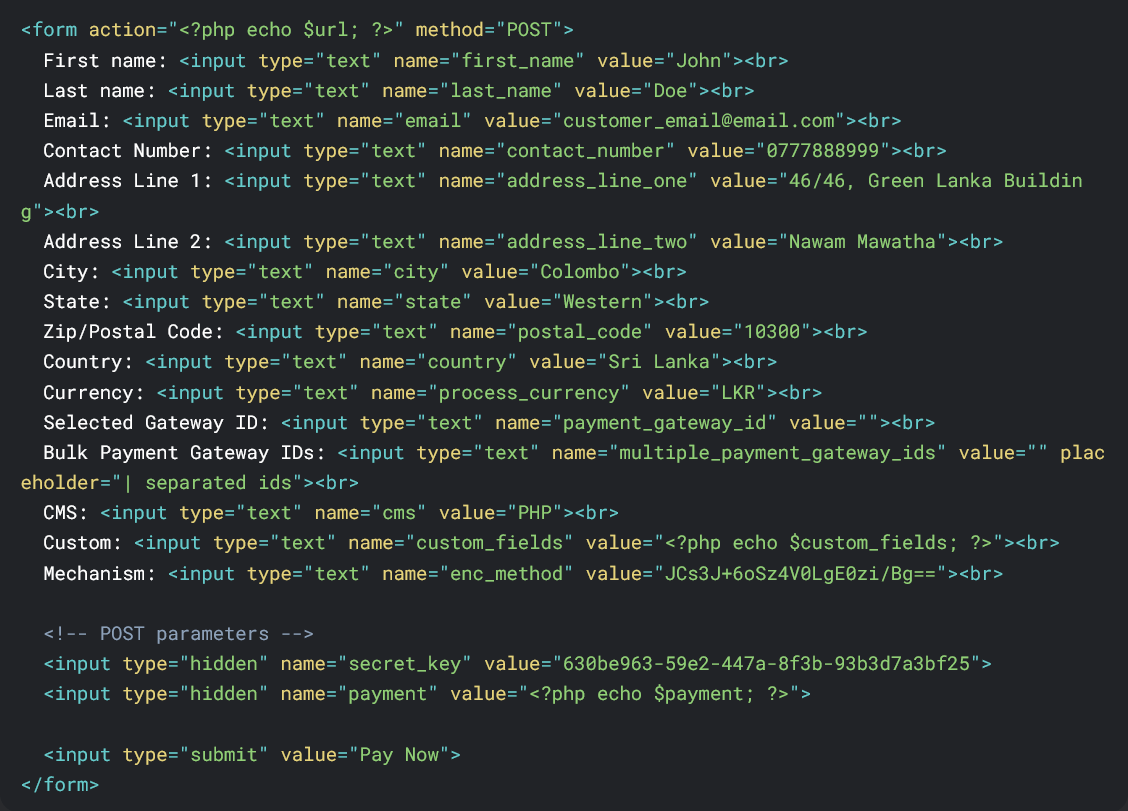
Existing parameter values will be posted via the html form below.
Note:
If the "payment_gateway_id" parameter is set in the gateway request, corresponding payment option will be selected automatically, and the gateway payment selection page will be skipped.
2.6 Transaction Response
After payment process is completed along with the whole transaction process, the customer will be redirected to the callback URL. (You can set the call back URL from WEBXPAY Dashboard > Settings > Website Integration > on Add Return URL field)
The callback process posts the following data to display the transaction status.
- payment
- signature
- custom_fields
The "payment" parameter should be decode using base64_decode method and then should be decrypted with openssl_public_decrypt methoc. The signature is included to avoid man-in-the middle attacks.
The format of the "payment" parameter would be as follows after decoding and decrypt methods are used.
order_id|order_refference_number|date_time_transaction|status_code|comment|payment_gateway_used
E.g.
12001|T372016I24522| 2016-04-20 09:57:52|15| No such issuer|1
You need to compare the decoded payment value against the decoded and decrypted signature in order to confirm the posted parameters' authenticity. (signature status)
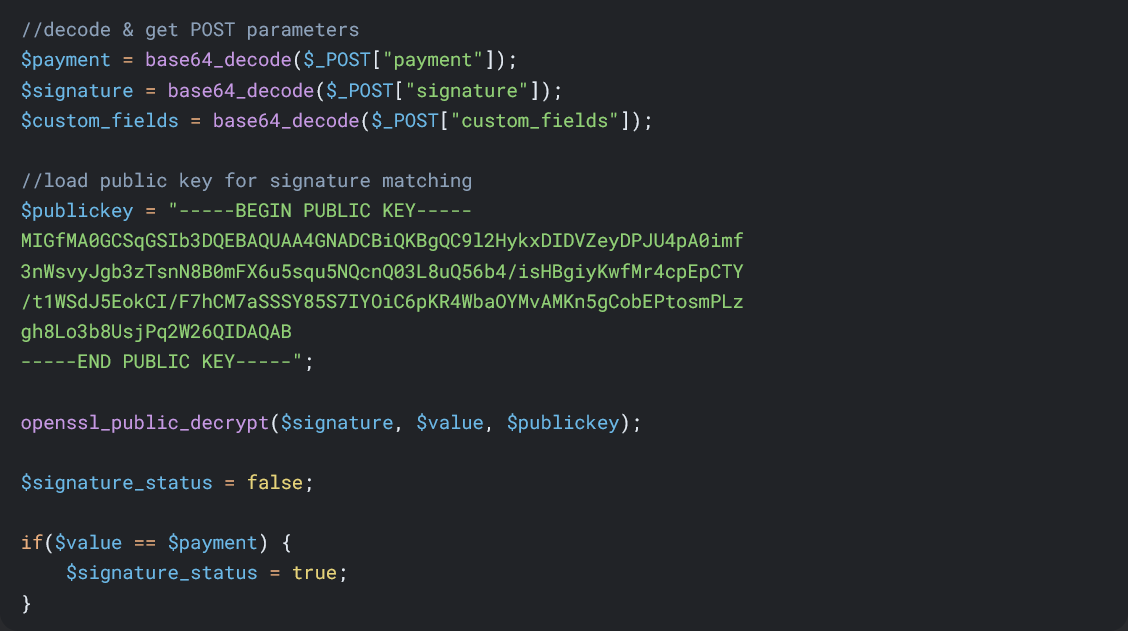
If the signature status is true, you can proceed to further steps.
2.7 Custom Fields
The format of the "custom_fields" parameter would be as follows.
E.g. parameter1|parameter2|parameter3|parameter4
The "custom_fields" parameter will consist of the above variables which would be decoded using base64_decode.